What Are AI Content Calendar Tools (and How Do They Differ From Templates?)
AI content calendar tools help you plan, draft, organize, and often schedule content across channels from one workflow. Unlike static templates, they do more than hold blank boxes for dates and topics. They can suggest themes, generate post variations, adapt tone, and turn a rough brief into a usable calendar faster.
That matters because most teams do not just need ideas. They need a repeatable system that moves from brainstorming to approval, then publishing, then performance review. Traditional project-management boards can track tasks, but they usually do not create channel-ready copy or learn from what performed well. AI tools sit closer to the content workflow, which is why they are useful for marketers who want speed without losing control.

The key expectation is simple: AI should draft and organize, while people still verify facts, apply brand judgment, and approve anything public. If you treat AI as a first-pass content engine, not a final publisher, you get faster output and fewer brand mistakes.
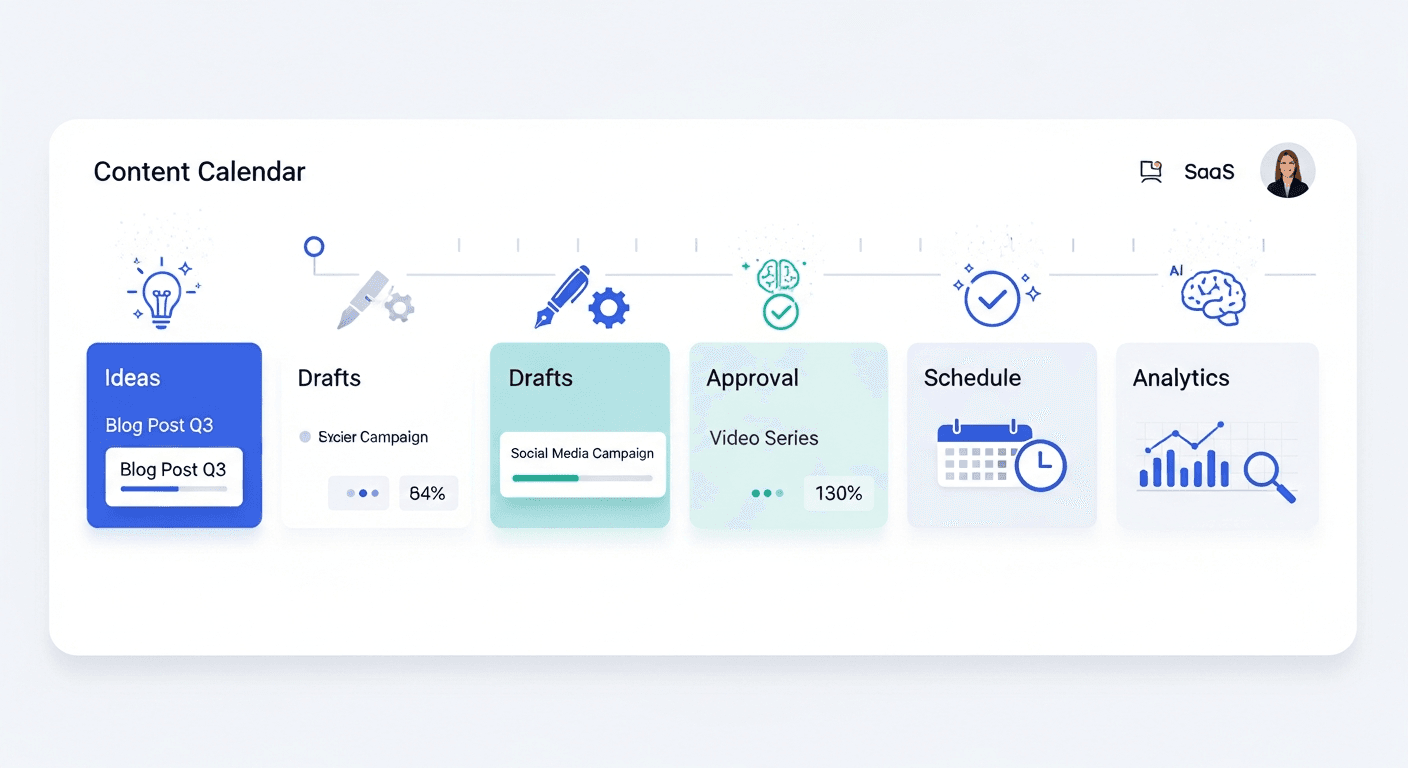
Core Workflow: Inputs, AI Calendar Drafts, Approval, Scheduling/Publishing, And Learning
A practical AI calendar workflow starts with inputs like audience, pillars, offers, and campaign dates. The tool then creates calendar ideas, captions, topic clusters, or channel variants. After that, your team reviews the output, schedules it, publishes it, and uses results to update the next round of prompts and themes.
That loop matters more than the tool itself. The best systems do not just generate content once, they improve over time.
What To Look For In The Best AI Content Calendar Tools
The best AI content calendar tools should fit your workflow, not just produce a lot of content. If you are a solo creator, you may care most about ideation and quick scheduling. If you are on a team, approvals, role permissions, and analytics may matter more than raw output.
Look for brand controllability first. A good tool should learn from examples, maintain consistent tone, and let you steer formats by channel. Next, check workflow integration. If the calendar cannot connect to your publishing tools, task system, or social channels, you will spend time copying and pasting instead of shipping.
Also evaluate output quality, which means more than grammar. Good output is specific, on-brand, and channel-aware. It should not sound like the same caption repeated across LinkedIn, Instagram, Facebook, and your blog.
Feature Checklist: Multi-Channel Formatting, Brand Learning, Collaboration, Scheduling, Analytics
Use this checklist when comparing tools:
- Multi-channel formatting: Can it tailor output for LinkedIn, Instagram, Facebook, email, and blog posts?
- Brand learning: Can you feed it examples, voice rules, product language, and banned phrases?
- Collaboration: Does it support comments, roles, approvals, and handoffs?
- Scheduling: Can you queue content or publish directly to the platform you use?
- Analytics: Does it show what worked, so you can refine future calendars?
Pricing should also be decision-oriented. Free plans are fine for testing ideas, but paid tiers usually unlock team seats, approval flows, more channels, and deeper scheduling limits. If you need governance and distribution, cheap tools can become expensive in labor.
Best AI Content Calendar Tools In 2026 (Shortlist + Who Each Is For)
Here is the short version: choose the tool that best matches your workflow stage. Some tools are strongest at ideation, some at all-in-one scheduling, and some at collaboration and governance.
| Tool | Best For | Workflow Fit | Strengths | Watch-Outs | Pricing Notes |
|---|---|---|---|---|---|
| Hovers.ai | SEO-led calendars and on-brand planning | Ideation to publishing | Fast 30-day calendar generation, channel-ready planning, strong brand focus | Best when you want structured content ops, not just a blank scheduler | Good fit for founders and small teams that want faster planning |
| Buffer | Simple scheduling and light AI support | Scheduling and consistency | Clean queue, easy publishing, low-friction use | Limited governance depth and less robust planning | Lower-cost entry, good for solo users and small teams |
| Later | Visual social planning | Visual-first social workflows | Strong Instagram and creator planning, visual calendar view | Less suited to blog-led or SEO-heavy workflows | Entry plans are accessible, but capabilities expand on paid tiers |
| Hootsuite | Broad social publishing and monitoring | All-in-one social ops | Publishing, inbox, approvals, and analytics in one place | Can feel heavy for smaller teams | More enterprise-leaning pricing |
| Sprout Social | Team collaboration and reporting | Governance-heavy teams | Strong approvals, reporting, and team workflows | Premium cost | Best for teams that need process control |
| CoSchedule | Campaign planning and editorial calendars | Marketing coordination | Good for campaign visibility across content types | AI depth varies by workflow | Mid-market option for content teams |
| Notion AI | Custom planning system | Flexible calendar building | Great for databases, docs, and custom editorial systems | Needs setup, and publishing is not native | Low-cost to start, but more manual operations |
How this list is ranked matters. I prioritized workflow fit, then output quality, then controllability, and finally operational features like approvals and scheduling. A tool that writes ten captions fast is less useful than a tool that creates five good ones your team can actually publish.
Hovers.ai is the best fit if you want a faster SEO-first calendar that can turn strategy into action. Buffer is better if you want a lighter scheduling stack. Hootsuite and Sprout Social make more sense when collaboration and approvals are central. Later is strongest for visual social content, while CoSchedule and Notion AI help teams that want more flexible planning systems.
How To Use An AI Content Calendar Tool Without Sounding Generic
A Repeatable Setup: Pillars, Audience Prompts, And Brand/Assets Ingestion
- Define your pillars first. Start with 3 to 5 content pillars tied to customer pain points, product categories, and proof points. This gives the AI structure instead of letting it guess.
- Seed the tool with strong inputs. Add sample posts, brand voice rules, product details, offer priorities, and examples of content you want to emulate.
- Tell it what to avoid. List banned phrases, weak claims, unsupported promises, and topics that are off-brand.
- Generate channel-specific versions. Ask for LinkedIn, Instagram, Facebook, and blog variations separately, because each platform rewards different lengths, hooks, and CTAs.
- Edit before publishing. Human review should check facts, tone, offer accuracy, and legal risk.
- Measure and update. Track engagement, clicks, saves, replies, and conversions, then refine pillars and prompts based on what actually worked.
The biggest mistake is copying one AI draft everywhere. LinkedIn often needs sharper insight, Instagram needs more visual clarity, and Facebook usually benefits from a simpler, more conversational angle. Your blog needs depth, proof, and search intent alignment, not social-style fluff.
A good loop is generate, edit, publish, measure, then improve the next calendar from real performance. That is how an AI calendar becomes a system instead of a content dump.
AI Content Calendar Workflows By Use Case (Solo, Agency, In-House)
Recommended Cadence And Review Steps For Each Team Type
Solo creators usually need speed and consistency. A weekly setup works well, where AI generates a month of ideas, the creator trims them down, and one publishing channel gets the first pass. The review step should be short, but it must still include factual verification.
Agencies need more structure. They usually benefit from shared workspaces, client approvals, and reusable prompts for each account. The best cadence is a monthly calendar with weekly review checkpoints, because that keeps stakeholders aligned without creating bottlenecks.
In-house teams need the most governance. They should build approval layers for marketing, legal, and subject matter experts when needed. This is especially important for regulated industries, product claims, and thought leadership content that could create reputational risk.
AI Calendar Governance: Approvals, Verification, And Originality Checks
AI content calendar tools work best when you add lightweight governance. Start with a simple approval chain: draft, factual check, brand check, and publish. If a post makes a claim, mention a statistic, or references product behavior, verify it before it goes live.
Originality matters too. AI can drift into repetition, generic tone, or recycled phrasing if you do not correct it. Keep a short originality check that asks, “Does this sound like us, does it say something specific, and does it offer a distinct point of view?”
Common Failure Modes (Hallucinations, Repetition, Weak Differentiation) And Fixes
- Hallucinations: Fix by requiring source checks, product fact sheets, and human review.
- Repetition: Fix by rotating hooks, angles, and content formats.
- Weak differentiation: Fix by adding customer proof, expert quotes, case examples, and specific outcomes.
- Off-brand tone: Fix by training the tool with better examples and stricter voice rules.
Governance does not need to slow you down. It just needs to catch the kinds of errors AI makes when it is left alone.
Conclusion: Choose The Right Tool, And Measure What Matters Next
The best AI content calendar tools are the ones that match your workflow stage, your team size, and your publishing needs. If you want ideation only, a lighter planner may be enough. If you need collaboration, approvals, and scheduling, choose a tool that supports the full loop from draft to publish to performance review. For founders and small teams that want a faster, on-brand workflow, Hovers.ai is a strong option because it helps turn strategy into a usable content calendar without adding more manual work.
Quick Test Plan For Your First 30 Days
- Generate one 30-day calendar.
- Run every post through human edits and verification.
- Publish to one channel first.
- Compare engagement, effort, and approval time.
- Update pillars, prompts, and brand inputs from the results.
- Decide whether the tool saves enough time to scale.
If you want an on-brand 30-day SEO content calendar with one-click publishing, try Hovers.ai and generate your next month in minutes. If you are a founder or small team, book a quick demo or start a free trial with Hovers to reduce planning time and maintain cadence.
Article created using Hovers.ai
Article created using Hovers.ai